Copy your address
Copy a temporary address from the popup and paste it into the form you are using.
YOUR TEMPORARY INBOX, IN THE TOOLBAR
Copy an address, open received mail, and copy detected verification codes. Access your gecici.email inbox from Chrome’s toolbar.
Desktop Chrome extension · English interface
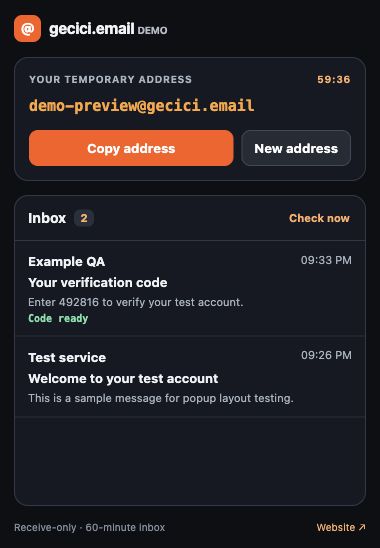
Copy a temporary address from the popup and paste it into the form you are using.
Open received messages. When a verification code is detected, use the Copy code button.
Use the context menu in an editable field to insert your current address.
Use the side panel button at the top of the popup to open your inbox beside the page.
Background checks can show a notification when new mail arrives.
The default inbox lifetime is 60 minutes. The countdown appears next to your address.
Open the Chrome Web Store and choose Add to Chrome. Pin gecici.email from Chrome’s Extensions menu.
Open the extension, read the first-use notice, and select Agree and create inbox to get a temporary address.
Choose Copy address. Open incoming messages in the extension and use Check now when you want to refresh.
REST API and MCP connections are available for your test automation or AI agent. Use the extension for manual work and the documented API flow for automation.
The extension and temporary inbox creation are free. You do not need a gecici.email account. Install the extension from the Chrome Web Store.
The current extension interface is in English. This page explains installation and the main controls.
This is a receive-only inbox; the extension does not send email. Some websites may reject temporary addresses.
The extension keeps inbox access in Chrome session storage. Access can be lost when the browser session ends, and the inbox lifetime continues to expire independently.
Use it for short-lived email needs and for testing registration or verification flows in your own application. Use a permanent address for important accounts that need lasting access.
Data processing and retention: Privacy policy.